

Most practices arrive at go-live day with a configured system, a trained team and a sense of cautious optimism. The hard work is done. The data has been converted. The appointments are loading. The team knows where to click.
Then, quietly, something does not quite work the way anyone expected. Not because the system failed. Not because the team was not capable. Because nobody stopped, before go-live, to map how work actually moves through the practice and what needed to change when it moved to a new system.
Workflow mapping is the step most practices skip. It is also the step that determines whether your Xestro investment delivers real change, or simply becomes a more sophisticated way of doing the same work you were already doing.
Before You Configure: Start With Clean Data
Before configuration begins, there is a step that is easy to overlook and costly to skip. Cleaning up your existing data in Genie before the migration happens.
A Xestro migration starts with a test data capture. Your Genie data is extracted and uploaded into Xestro so that you and your team can review what has come across. This review is the practice’s responsibility, not Xestro’s. You need to check that all the data has transferred successfully, and that it has landed in the correct fields in the new system.
But here is the problem. If the data you are migrating is not clean to begin with, the migration will simply carry those problems across into Xestro. Old patient records that were never used. Duplicate entries sitting alongside the correct record. Procedures with no description. Pending procedures that were created but never actioned.
Clean data in. Clean data out. The quality of what you migrate determines the quality of what you start with on day one.
Before the migration, take the time to review your Genie data and clean up what needs to be cleaned up.
- Archive patient records that have never been used.
- Remove or merge duplicates.
- Complete or delete incomplete procedure records.
- Check your pending procedures list.
This work is unglamorous and time-consuming. But it means you go live on Xestro with accurate, usable data.
Why Configuration Is Not Enough
There is an important difference between configuring a new system and redesigning how work flows through it. Configuration is about the software. Appointment types, locations, fee schedules, staff access, integrations. It is essential and it needs to be done correctly. It ensures the system is set up properly, but it does not answer the more important question: Is the practice set up to work differently?
That next question is what workflow mapping answers.
When a practice migrates to Xestro without mapping its workflows first, the team learns where the new buttons are, the data comes across, the system goes live and then, because nobody redesigned the underlying process, the practice begins running on a combination of the new system and the old habits. Not quite the old way. Not quite the new way. Something in between, a collection of survival patches and workarounds built under pressure during go-live that quietly become the new standard.
That in-between costs the practice time every single day. It is entirely avoidable.
Start With a Wishlist
Before you map a single workflow, there are two questions you need to answer.
- What was not working well in the old system that led you to make the change?
- What do you want to work differently in the new system?
Write these answers down. This becomes the start of your Xestro Wishlist and it is one of the most useful tools you will create during your entire implementation.
The Wishlist is not just a feature request list. It is a thinking tool, a way of capturing an honest assessment of where your current workflows are failing you, before the go-live pressure begins and everyone is too busy keeping the practice running to think clearly about what they actually want to change.
Without a Wishlist, good ideas become scope creep. A staff member mentions mid-implementation that it would be useful to automate sending patient registration forms before their first appointment. Someone raises integrated EFTPOS. The billing coordinator wants different reporting. Each of these ideas has merit. Added at the last minute, they create delay, complicate configuration and often do not get properly set up because the implementation is already in its final stage.
With a Wishlist, those same ideas are captured, preserved and ready to be actioned in a structured way, either as part of the go-live scope if they are critical, or as a clear post-go-live roadmap if they can wait. The Wishlist prevents scope creep without losing good thinking. It gives everyone a place to put ideas that are not for now, without those ideas disappearing entirely.
Your Wishlist will typically contain two types of items:
- The first are the non-negotiables: the things that must work from day one because the practice cannot function without them. These go into your go-live scope.
- The second are the enhancements: integrations you want to explore, automation you would like to add, reporting you want to build once the core workflows are stable. These go on the Wishlist and become your first post-go-live project list.
For many practices, the Wishlist includes things like integrated deposit payment links so patients can pay a deposit before their appointment once the billing workflow is bedded in, automated reporting templates once data entry is consistent, and automated follow-up tasks once the core appointment types are running cleanly. None of these need to happen on day one. All of them are worth capturing so the thinking is not lost.
One Service. One Patient. One Journey.
Once you have your Wishlist, the next step is to map your first workflow. The most important advice here is the same principle that sits at the heart of David Jenyns’ SYSTEMology methodology: do not try to systemise everything at once.
In SYSTEMology, the starting point is always the Critical Client Flow, one target patient, one primary service or treatment, one end-to-end journey. The reason is straightforward. Trying to map every workflow before you have systemised anything is overwhelming, unfocused and almost always leads to nothing being completed properly. Mapping one clear journey, the one that runs every day at the highest volume through the most hands, gives you immediate traction and reveals the gaps that matter most.
Applied to a Xestro implementation, this means starting with your most popular service. Not the most complex. Not the most interesting. The one that gets done the most.
For most specialist medical practices, that is the standard new patient journey: first contact, booking, arrival, consultation, billing, follow-up. It is the pathway that runs every single day. It touches every member of the team at some point. It is the workflow that, if it runs cleanly in Xestro, creates the foundation everything else is built on.
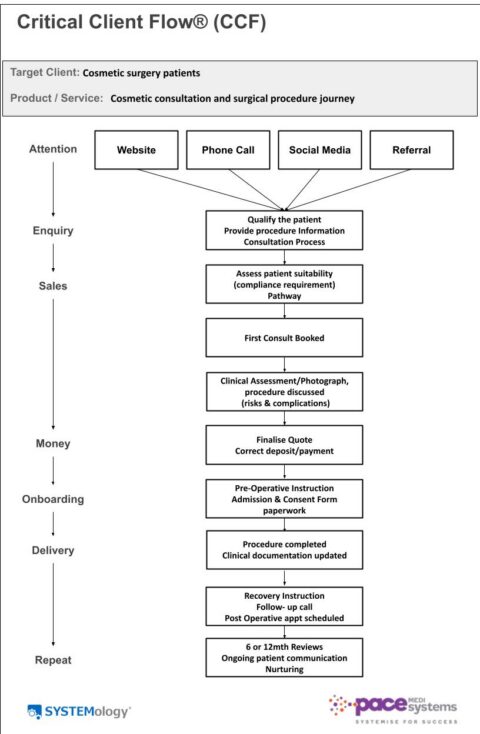
Walk through that journey step by step. Not how you would like it to work. Not how the software brochure says it should work. How it actually works right now, today, in your practice.
Write down every step. Note who is responsible for it. Identify where the handoffs happen, the moments where one person’s work becomes another person’s starting point. Mark the places where things currently fall through the gap: the task that gets missed when someone is on leave, the paper that sits in an inbox waiting for someone to act on it, the follow-up that depends on one person remembering rather than a system triggering it automatically.
That document is your baseline. It shows you where the practice is today. It is the map you bring into your Xestro configuration discussions, because the question you are now equipped to ask is not how do we set this up, but how do we set this up so that the parts that currently fail do not fail anymore?
The Five Questions That Shape a Workflow Map
Once you have walked the patient journey and identified where the gaps are, structure what you have found into something you can act on. For each stage of the journey, work through five questions.
- What needs to happen at this stage? Not what currently happens, what should happen for the practice to run well.
- Who is responsible for making it happen? One person. Not the front desk or the clinical team, one named role with clear ownership of that step.
- What does Xestro need to do to support this step? Is it an automated document? A triggered task? An appointment type that prompts the right action at the right moment?
- What does the team need to know or be able to do? What training, access or understanding is required before this step can run reliably?
- How will we know this step is working correctly after go-live? What does it look like at 30 days, 60 days and 90 days?
That last question is the one most workflow mapping exercises miss. It is not enough to design a workflow and implement it. You need to know, in advance, how you will recognise whether it is working, because if you do not define that before go-live, the first sign of a problem will be three months later when a patient falls through a gap that nobody checked.
A Practice Beginning to Map This Properly
I am currently working with a practice that is in the process of implementing Xestro. The migration is still underway and the practice has not yet gone live. But even during the implementation phase the importance of workflow mapping is already becoming clear.
As we started walking through the primary patient journey from first contact to billing, several workflow gaps quickly became visible. Web enquiries were arriving in an external email and would have required manual transfer into Xestro. Referrals were sitting in inboxes waiting to be actioned. Different patient journeys were being managed under the same generic appointment type, despite requiring very different documentation, billing pathways and follow-up processes.
One useful example was the distinction between cosmetic patients and skin cancer patients. In the old system, both were managed under a single new patient appointment type. But in Xestro, to take full advantage of the automation and workflow functionality, they require different structures because the patient journeys are fundamentally different.
A cosmetic patient may move through consultation, quotation, cooling-off period, theatre booking and deposit collection. A skin cancer patient follows a completely different pathway, with different urgency, documentation, billing and follow-up requirements.
None of this was a software issue. It was a workflow design issue. Identifying these differences before go-live creates the opportunity to configure the system around how the practice actually needs to operate, rather than discovering the gaps later under pressure.
That is what the Critical Client Flow principle makes possible. Not systemising everything at once. Starting with the one journey that matters most, mapping it properly, and building from there.
Go Live on the Workflow, Not Just the Software
The practices that get the most from Xestro are not the ones with the most sophisticated configuration. They are the ones that were clear, before go-live, about how they wanted work to flow through their most important patient journey and built the system to support that.
A Wishlist captures what you want to be different. A workflow map of your Critical Client Flow shows you what needs to change to get there. Together, they give your implementation the direction it needs before configuration begins and a reference point for the months after go-live when the pressure lifts and old habits start to quietly return.
The work is not complicated. But it does need to happen before go-live, not after. Start with clean data. Build your Wishlist. Walk the journey as it actually runs today. Work through the five questions. Then go live with a practice that is ready, not just a system that is configured.
About This Series
This is the final article in a three-part series on implementing practice management software in medical practices.
Part 1: Why Switching to Xestro Is a Workflow Change, Not Just a Software Change
Part 2: The Three Jobs of an Xestro Migration: And Why Most Practices Only Do One
Working With Denise Pacey
If reading this has made you realise that your workflows were not mapped before go-live, or if you are planning a migration and want to make sure the foundations are right from the start, this is exactly what Pace MediSystems consulting services are designed to support.
Whether you need help cleaning up your data before migration, building your Wishlist, mapping your primary patient journey, or working through the five questions with someone who has done this before, get in touch to discuss what your practice needs.
About Denise Pacey
Denise Pacey is the founder of Pace MediSystems and a Certified SYSTEMologist with over two decades of experience in specialist medical practice management. She works with medical practices across Australia in three areas: practice systemisation, Xestro implementation and coaching/mentoring.
Pace MediSystems. Systemise for Success.